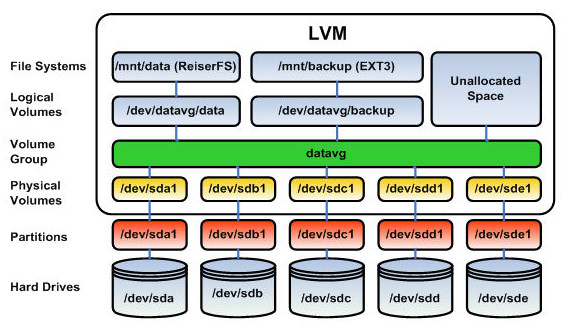
|
Size: 1288
Comment:
|
Size: 1220
Comment:
|
| Deletions are marked like this. | Additions are marked like this. |
| Line 1: | Line 1: |
| #acl All: | |
| Line 18: | Line 17: |
| (source: [[WikiPedia:Logical_Volume_Manager_(Linux)|WikiPedia]] ) | (source: [[WikiPedia:Logical_Volume_Manager_(Linux)|WikiPedia]]) |
| Line 20: | Line 19: |
| == Subitem 1.1 == Text {{{ for i in `ls`; do echo $i; done }}} |
= Theory = |
Contents
Description
In Linux, Logical Volume Manager (LVM) is a device mapper target that provides logical volume management for the Linux kernel. LVM is used for the following purposes:
- Creating single logical volumes of multiple physical volumes or entire hard disks (somewhat similar to RAID 0, but more similar to JBOD), allowing for dynamic volume resizing.
- Managing large hard disk farms by allowing disks to be added and replaced without downtime or service disruption, in combination with hot swapping.
- On small systems (like a desktop), instead of having to estimate at installation time how big a partition might need to be, LVM allows filesystems to be easily resized as needed.
- Performing consistent backups by taking snapshots of the logical volumes.
- Encrypting multiple physical partitions with one password.
LVM can be considered as a thin software layer on top of the hard disks and partitions, which creates an abstraction of continuity and ease-of-use for managing hard drive replacement, repartitioning and backup.
(source: WikiPedia)
Theory